
Best On-Prem Setup for a Startup Training Small LLMs (<13B)
A startup working with sub-13-billion-parameter models needs far less hardware than the headlines suggest: a single GPU workstation with 48–141 GB of VRAM handles fine-tuning (QLoRA/LoRA) and inference for models up to 13B. You do not need a cluster to build a real product — one well-chosen workstation covers development, fine-tuning, and serving your first users, and it keeps your data and costs in-house.
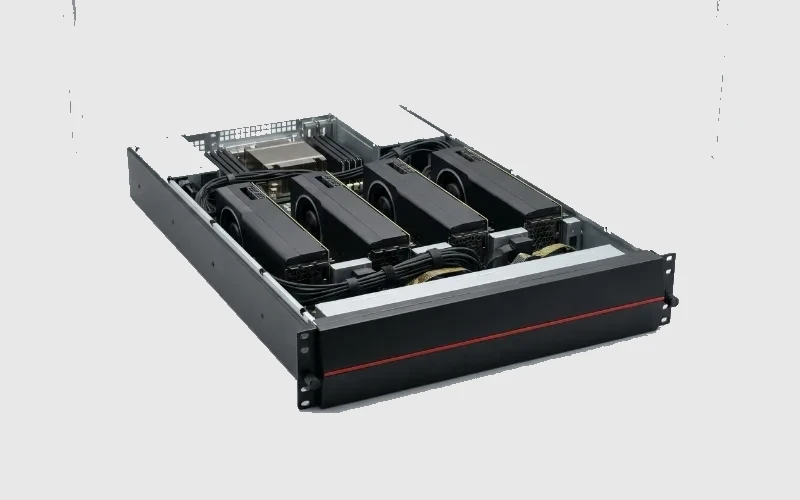
TL;DR — the startup setup
- One GPU workstation is enough for <13B: fine-tune (QLoRA/LoRA) and serve on 48–141 GB VRAM.
- Fine-tuning is cheap at this size: a 13B QLoRA fits comfortably on a single 48 GB card; full fine-tune of <7B fits one high-memory GPU.
- Own, don't rent, once you iterate daily — a workstation pays back fast versus hourly cloud at sustained use.
- Scale later: move to a GPU server when you need multi-user serving or bigger models.
What this sizes
The minimum viable on-prem setup for a startup building on small (<13B) LLMs — fine-tuning and serving — chosen to keep data in-house and burn low. Larger models are covered in the 70B guides.
Why small models need little hardware
Memory scales with parameters: a 13B model ≈ 26 GB (FP16), ~13 GB (FP8), ~7 GB (4-bit); a 7B is roughly half that. So:
- Inference: a 13B serves on a single 24–48 GB GPU (e.g. L40S 48 GB) at FP8/4-bit — plenty for your first users.
- Fine-tuning: QLoRA on a 13B fits one 48 GB card; LoRA wants ~48–96 GB; full fine-tune of a <7B fits a single high-memory GPU. (Method dominates — see the 70B fine-tune guide for the same math at scale.)
The recommended workstation
Table 1 — Startup on-prem setup for <13B LLMs.
| Job | GPU | Why |
|---|---|---|
| Inference + QLoRA (13B) | 1× 48 GB (L40S-class) | serves users + adapter tuning; lowest cost |
| Headroom / 13B LoRA / small full-FT | 1× H200 (141 GB) | one card covers fine-tune + serve + growth |
| Multi-user serving later | move to a GPU server | when concurrency exceeds one workstation |
Reading Table 1: start with one workstation. A 48 GB card runs a product on 7B–13B models; step to a 141 GB H200 if you want a single machine to fine-tune *and* serve with room to grow.
Assumptions & scope
Dense models <13B; FP8/4-bit serving and QLoRA/LoRA tuning; validate on your framework and dataset. Concurrency for a startup's first users is low — one GPU suffices. Estimates, not a quote.
Where RDP GPU Mart fits
RDP GPU Mart builds CARINA/QUASAR AI workstations ideal for a startup's first setup — enough VRAM to fine-tune and serve sub-13B models on one machine — India-manufactured, INR-transparent, and DPDP-aware so your data and IP stay in-house from day one. *(Configure a startup AI workstation or request a quote at RDP GPU Mart.)*
FAQ
What hardware does a startup need to fine-tune small LLMs? One GPU workstation with 48–141 GB VRAM handles QLoRA/LoRA fine-tuning and inference for models up to 13B.
Can I fine-tune a 13B model on one GPU? Yes — QLoRA on a 13B fits a single 48 GB card; a 141 GB H200 gives room for LoRA, small full fine-tunes, and serving.
Should a startup buy or rent? Buy a workstation once you iterate daily — it pays back quickly versus hourly cloud, and keeps data in-house.
When do I outgrow a workstation? When you need multi-user production serving or larger (30B–70B+) models — then move to a GPU server.
—
Related
- How Many GPUs to Fine-Tune a 70B LLM On-Prem?
- GPU Workstation or GPU Server? A Decision Guide
- On-Prem vs Cloud GPU: True TCO for AI Training in India
Research log (Rule #1)
1. Spheron (2026) — fine-tune VRAM by method (QLoRA/LoRA/full). https://www.spheron.network/blog/gpu-vram-requirements-fine-tune-llm-2026/ 2. apxml (2026) — model VRAM by size/precision. https://apxml.com/models/llama-3-1-405b 3. NVIDIA — H200 datasheet (141 GB single card). https://www.nvidia.com/en-us/data-center/h200/ 4. Atlantic.net (2026) — GPU tiers (L40S-class for small models). https://www.atlantic.net/gpu-server-hosting/top-nvidia-gpus-for-ai-training-and-inference/ 5. iternal.ai (2026) — on-prem AI hardware sizing. https://iternal.ai/hardware-sizing-guide
Ready to deploy?
Talk to an RDP architect about power, cooling and lead time.